MelodyGenie Review 2026
Fix the Lyric Before You Spend Credits on the Song
Most AI song generators ask for a prompt first and make the expensive decision — rendering audio — before the cheap decisions are settled. The point of view may drift, the second verse may repeat the first, or a line may look fine on screen and fail the moment somebody has to sing it. You discover all of that after the credits are gone.
Melody Genie reverses the order. It puts a songwriting layer in front of seven selectable music models, then keeps eligible songs editable after the first generation. The best reason to use it is not that it has one more generator. It is that you can fix the lyric before choosing which generator deserves the song.
The direct verdict
MelodyGenie makes the most sense when the writing is the bottleneck. Its lyric-first order, separate writing/music direction and seven-model picker are meaningful. The trade-offs are equally clear: credits can disappear quickly on premium routes, post-generation controls vary by model, exact lyrics are not guaranteed, and there is no MIDI export.
Table of Contents
MelodyGenie in 30 Seconds: Ten Claims Checked
This is the compact answer. Each limitation is part of the verdict rather than a footnote, because the limitation decides whether a feature fits a real session.
| # | Claim | What it means in practice |
|---|---|---|
| 1 | It is a lyric-first studio, not just another one-prompt song generator | Writing, audio generation and post-generation revision are separate layers in one workspace |
| 2 | The lyric can be fixed before audio credits are spent | Rewrite tools and the free Genie Score expose weak lines before rendering, but the creator still approves the words |
| 3 | Writing Style DNA and Music Style DNA are independent controls | One profile can guide vocabulary and rhyme while another guides vocals and production |
| 4 | Genie Score rates lyric craft before generation | It scores six craft dimensions; it does not predict streams, virality or whether a song will become a hit |
| 5 | Seven music models sit behind one Generate button | Costs run from 3 to 100 credits, and voices, source audio, section editing and stems do not transfer to every route |
| 6 | You can use your own authorized voice or original beat | Voice, beat and style are separate inputs; only upload material you own or have permission to use |
| 7 | Supplying the exact lyric does not guarantee a word-perfect performance | Pronunciation, timing, omissions and structure can vary, so every complete take needs an end-to-end listen |
| 8 | Eligible songs remain editable after generation | Replace, extend, restyle and stem actions depend on the model, completed song and plan; the source version is preserved |
| 9 | MP3, WAV and stems support a DAW handoff | Export access varies by plan and model, and there is no MIDI export |
| 10 | One shared credit balance covers writing and music actions | Plans include 14 to 1,000 monthly credits; expensive engines can consume the allowance far faster than the default route |
What MelodyGenie Actually Is: Three Products in One Workflow
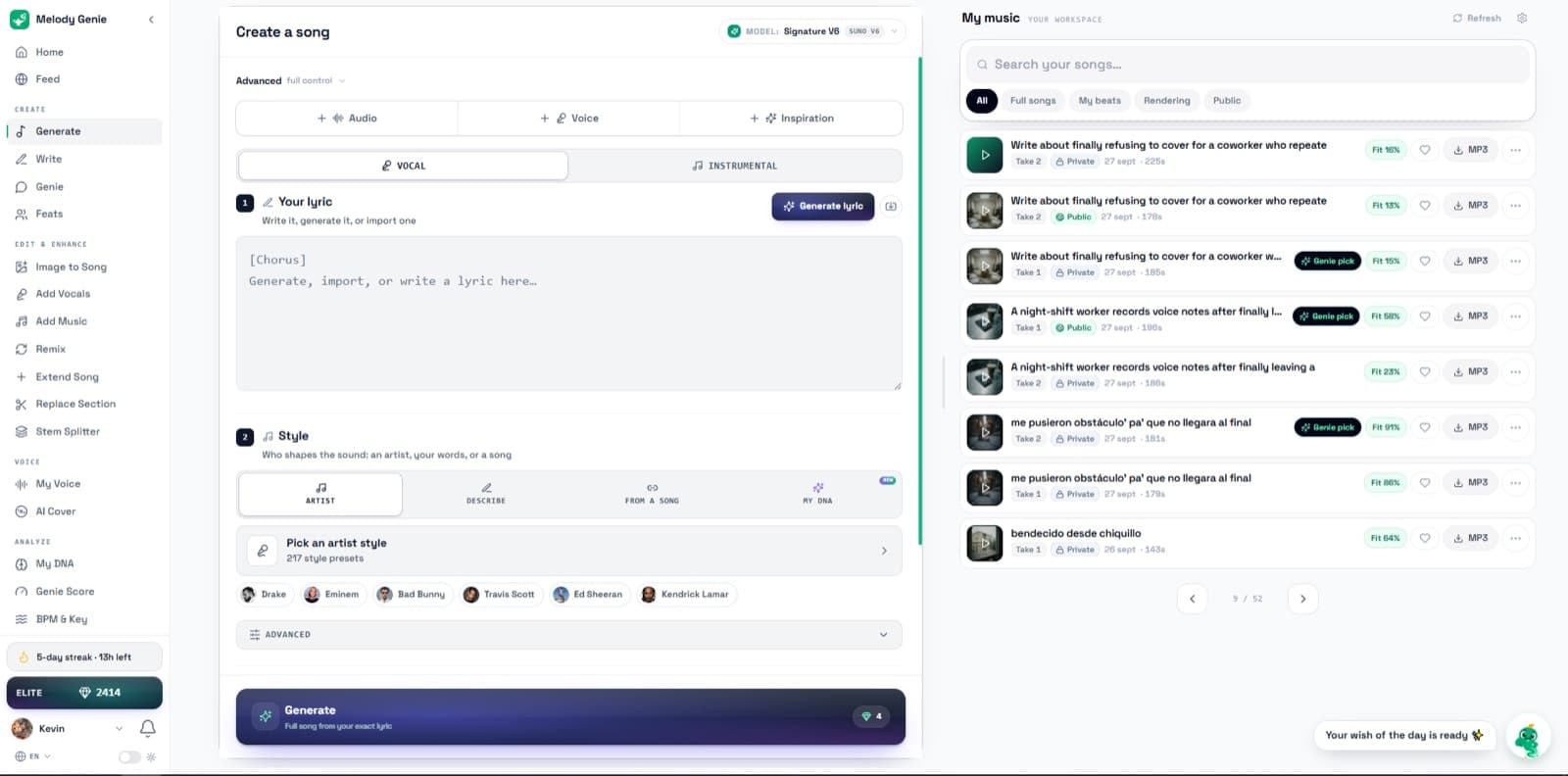
Calling MelodyGenie an “AI song generator” hides the useful part. The generator is only the middle layer. The complete product has three separate jobs.
1. Write
Develop the lyric from an idea, beat, image, hum or existing draft. Rewrite lines, test cadence and score the craft before audio.
2. Render
Choose one of seven model routes after the lyric and music direction are defined. See the credit quote before generation.
3. Revise
On eligible songs, replace a section, extend or restyle the song, split stems and export an audio asset for the DAW.
That order is the differentiator. A weak line costs almost nothing to repair as text. Once it has been performed, arranged and rendered, the same line becomes an audio problem. MelodyGenie moves more decisions into the cheaper side of that boundary.
The Eight-Step Lyric-First Workflow
The steps below are ordered to minimize expensive retries. The first four define the song, the fifth chooses the renderer, and the final three turn a generated take into an asset you can continue producing.
| Step | Goal | Check before moving on |
|---|---|---|
| 1. Start with the strongest source you already have | Use an idea, existing lyric, authorized beat, photo, screenshot, hum or voice note instead of padding an empty prompt | The first draft contains a specific detail that could only have come from your source |
| 2. Finish the lyric before rendering the record | Fix point of view, hook, rhyme, cadence and section order while every change is still cheap | Read or rap the lyric out loud and remove every line you would not perform |
| 3. Use Genie Score as a diagnostic | Find the weakest craft dimension without pretending a score can forecast audience response | The proposed fix improves a named line or section rather than merely raising a number |
| 4. Separate the writing direction from the music direction | Choose vocabulary and rhyme independently from vocal and production character | You can explain what each DNA choice contributes without asking for a clone |
| 5. Choose the model after the song is defined | Spend credits according to the job: exploration, instrumental, long form, premium vocal interpretation or export need | The live composer shows the expected credit cost and compatible actions before generation |
| 6. Audit every word and transition in the rendered take | Catch pronunciation changes, missing words, awkward stresses, repeated lines and structural drift | Listen from the first transient to the final tail while following the lyric line by line |
| 7. Repair the smallest possible section | Replace a weak section or extend the ending without discarding a take that already works | Compare the new transition against the preserved source version at matched level |
| 8. Export the right asset and finish in the DAW | Take the eligible WAV, MP3 or stems into the environment where arrangement, processing and release checks are precise | Confirm format, duration, sample alignment, rights and mix translation before release |
1. Start With the Strongest Source You Already Have
The weakest way to begin is “write me a sad pop song.” MelodyGenie accepts a normal idea, but it also gives you more specific starting material: an existing lyric, an original beat, a photo or screenshot, a hum, a freestyle and a voice note. Specific input matters because it gives you something objective to preserve through every AI transformation.
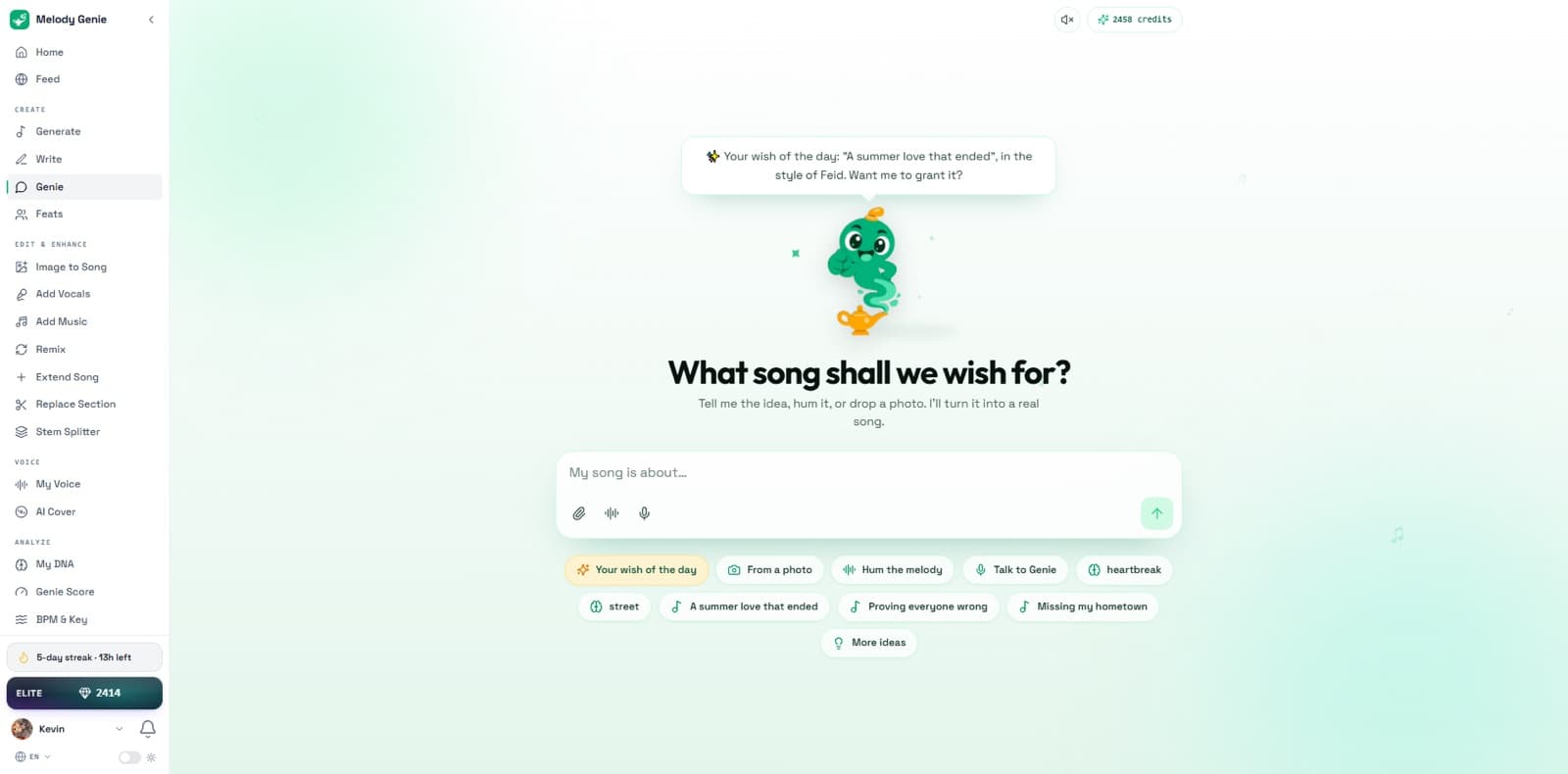
The screenshot-to-song workflow is a good example. A chat or note becomes a visual brief and then an editable lyric; it does not need to become final audio immediately. For a photo, the product says it uses the visible scene, light, color, mood and details to form that brief. Genie is the guided conversational route through the same process: begin with one idea, then work step by step toward a finished song instead of filling every control at once. The creator still decides which detail is true enough to keep.
2. Finish the Lyric Before Rendering the Record
MelodyGenie documents seven writing tools: Write, Beat Matcher, DNA Mixer, Mumble Flow, artist-inspired chat, Custom Lyricist and Style Rewriter. They cover different failure points rather than seven cosmetic ways to press Generate.
- Write develops full drafts, verses and hooks from the brief.
- Beat Matcher estimates tempo, energy and phrase spacing so line length starts closer to the instrumental.
- DNA Mixer blends two or three creative profiles with adjustable influence.
- Mumble Flow turns a hum, freestyle or rhythmic voice note into editable words.
- Artist chat is a brainstorming surface built around a creative profile, not contact with the real artist.
- Custom Lyricist builds a private reusable profile from your vocabulary, rules and permissioned references.
- Style Rewriter changes vocabulary, flow and rhyme behavior while preserving the underlying topic.
The right standard is not whether the first draft looks clever. Read it out loud. Rap it over the beat. Mark every phrase you would avoid saying in a room with another writer. Fix the point of view and section logic before asking any music model to disguise the problem with production.
Beat Matcher and your own voice solve different timing problems
Beat Matcher works upstream: it uses estimated signals from an instrumental to guide the density and length of the writing. The authorized personal-voice workflow works at rendering time: your saved voice is selected separately from the writing and music direction. Neither removes the performance check. Estimated BPM does not choose the pocket for you, and a voice model still needs material you have the right to use.
3. Use Genie Score as a Diagnostic, Not a Hit Predictor
Genie Score evaluates a lyric from 0 to 100 across six craft dimensions: hook, memorability, originality, emotional arc, coherence and singability. Reading the score is free on every plan. The product’s most responsible language is also its most important: a 90 means the lyric is built well according to those craft signals; it does not mean the song will stream, chart or go viral.
The useful output is the diagnosis naming the weakest area, not the total. If the tool says the emotional arc stalls in verse two, inspect the turn into the chorus. If it flags singability, perform the actual line. MelodyGenie lists a one-credit “Fix the weakest part” action and a three-credit “Improve to 90+” action. The first is usually the better discipline because it gives one revision a clear job.
4. Separate Writing Style DNA From Music Style DNA
This is the deepest control in the product. Writing Style DNA can guide vocabulary, rhyme architecture, cadence, hooks and phrasing. Music Style DNA can guide vocal and production direction. The two selections can match, but they do not have to. You can borrow the writing mechanics of one reference and send the finished lyric toward a different production language.
That separation is more original than asking for an entire song “like” one person. It also makes the responsibility clearer: profiles are craft references, not the real artist, an endorsement or permission to clone a voice. MelodyGenie advertises more than 100 profiles across more than 20 languages; profile depth varies, and slang or cultural context still needs a native review.
My DNA is not the same thing as an artist-inspired preset
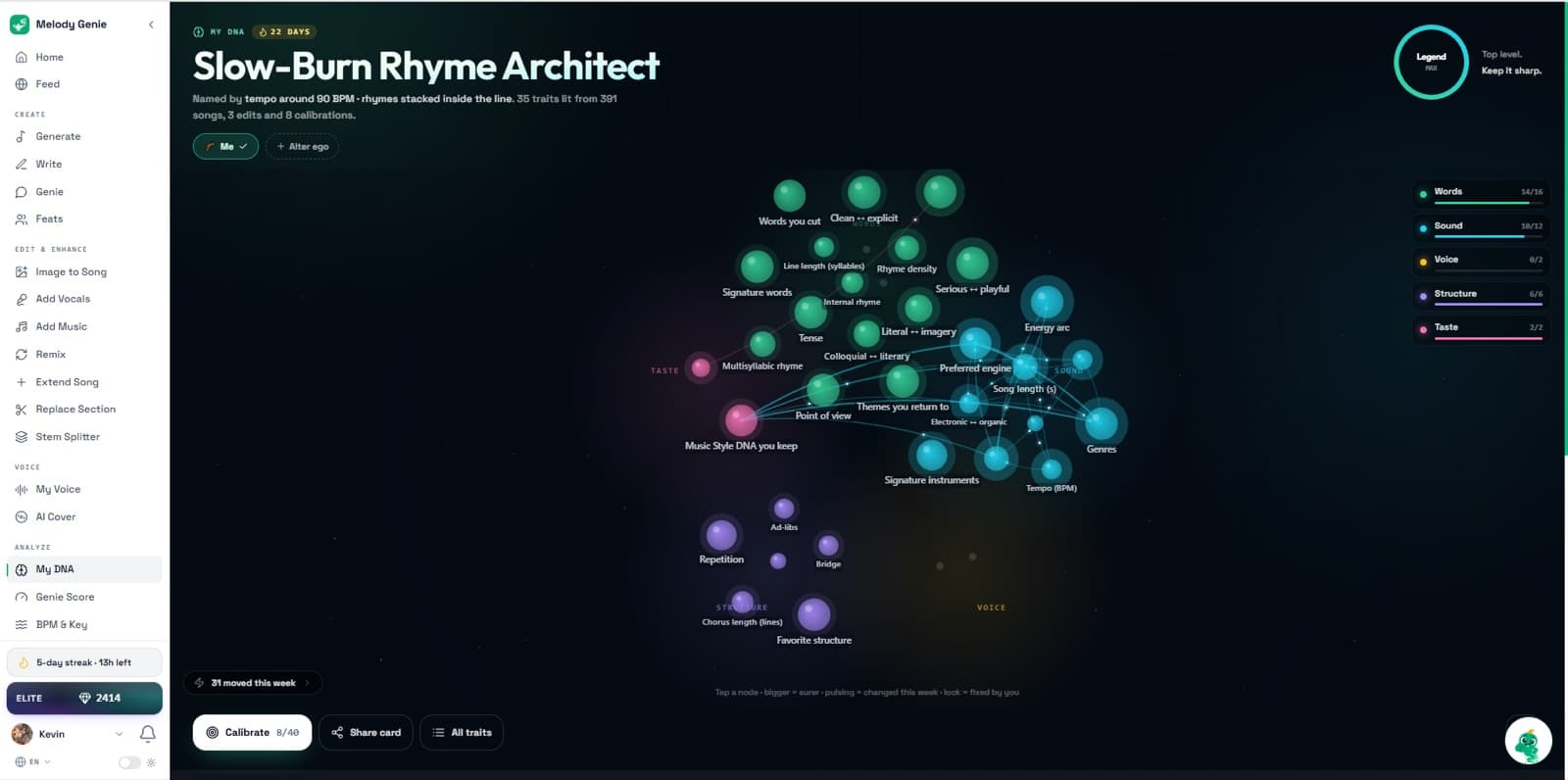
My DNA is the user-specific layer. MelodyGenie says it learns from what you keep, cut, finish, replay and choose inside your own account, then organizes that profile into Words, Structure, Sound, Voice, Themes and Taste. Explicit choices override it, learning can be paused, and the profile can be reset or deleted with the account. That is a better concept than invisible personalization because the user can inspect and correct it.
5. Choose the Music Model After the Song Is Defined
MelodyGenie currently puts seven provider models behind one selector and shared credit wallet. This is convenient, but it is not a promise that seven models behave like seven interchangeable presets. The official AI music model guide says saved voices, source audio, editing and stem actions vary by route. The live composer, not this table, is the final authority before you spend credits.
| Route | Underlying model | Reference credits | What to check |
|---|---|---|---|
| Rapid | ACE-StepLow-cost full song with singing | 3 | Use for cheap direction tests before a premium render |
| Loop | Stable Audio 3Instrumental only | 3 | Does not perform the lyric in the editor |
| Signature V6 | Suno V6Default route; normally two takes | 4 | Confirm voice, source-audio and editing compatibility in the composer |
| Studio | Google Lyria 3.5Alternative full-song interpretation | 8 | Do not assume a saved voice or post-generation action transfers |
| Vivid 2.6 | MiniMax Music 2.6Alternative full-song interpretation | 9 | Compare the same lyric and brief rather than unrelated prompts |
| Vivid | MiniMax Music 3Up to 5 minutes; WAV listed | 22 | Longer output increases the need to audit structure and repeated lyrics |
| Ultra | ElevenLabs Music v2.5Up to 2 minutes | 100 | A single run can consume 10% of an Elite monthly allowance |
Reference prices documented by Melody Genie on October 6, 2026. Models, versions, availability and credit quotes can change after integration testing; check the value shown in the composer before every request.
The cheapest sensible workflow is not to run all seven. Use a 3- or 4-credit route to test whether the lyric, structure and direction survive generation. Move to a premium route only when you can name what the cheaper result failed to deliver. Otherwise model choice becomes an expensive slot machine.
6. Audit Every Word and Transition in the Rendered Take
Exact lyrics guide these models; they do not program them. MelodyGenie’s own model page warns that words, pronunciation, timing and structure can vary. Follow the lyric line by line through the entire take. Listen for swallowed consonants, shifted stress, repeated phrases, missing words, sudden vocal identity changes and sections that enter early or late.
This is also why two takes from Signature V6 should be treated as two performances, not duplicate options. Keep a simple failure log: which line changed, at what timestamp, and whether the problem came from the writing or the rendering. If the stress is wrong in both takes, repair the lyric. If one take performs it correctly, the lyric may be fine and the model simply varied.
7. Repair the Smallest Possible Section
Eligible completed songs can expose section replacement, extension and restyling. The useful design choice is non-destructive versioning: changing one section creates a new result while preserving the source. That lets you compare the repaired transition against the take that originally worked instead of gambling the whole song again.
Stem separation needs equally precise language. MelodyGenie’s current documentation ranges from a two-part vocal/instrumental split to deeper lanes on supported Signature songs. It is not a general-purpose separator for any third-party upload, and dense arrangements can still bleed across stems. Check the actions attached to the completed song rather than assuming every route produces the same stem set.
Feats is collaborative writing, not a collaborative DAW
Feats lets two to four people contribute ideas and lines in timed rounds, vote on direction and receive the same fused song in a synchronized premiere. That is a distinct social writing format. Nobody is editing tracks or automation together, so it should not be confused with a shared DAW session. The collaboration happens in the brief and lyric, not in the mix.
8. Export the Right Asset and Finish in the DAW
MP3 is convenient for auditioning and sharing. WAV is the better handoff when the model and plan expose it. Stems give you additional balance and processing control. None of those is MIDI. If you need to change a chord voicing, move individual notes or replace the generated instrument with your own library, audio exports do not solve that job.
Once the file reaches Logic, Ableton, FL Studio or another DAW, the problem changes from generation to production. Check timing against the grid without flattening every human movement; inspect the vocal for synthetic high-frequency texture; high-pass only what the arrangement does not need; and level-match every processing decision. The guides to using reference tracks, getting vocals to sit in a mix and mixing for streaming cover that second half of the job.
MelodyGenie Pricing: Count Actions, Not “Songs”
The monthly tiers are simple; the model economics are not. One shared balance covers lyrics, generation and later actions. A “song” can therefore mean a 3-credit experiment, a 4-credit request returning two takes, or a 100-credit premium render before any section edit or stem action.
| Plan | Monthly price | Credits | Practical read |
|---|---|---|---|
| Free | $0 | 14 | Four 3-credit Rapid requests or three 4-credit Signature requests before other actions; not for commercial use |
| Starter | $7.99 | 160 | All seven writing tools, MP3 downloads and commercial-use permission |
| Pro | $16.99 | 400 | More room for iteration plus advanced controls and creator-profile features |
| Elite | $39.99 | 1,000 | Largest monthly balance and priority support; ten 100-credit Ultra runs before other actions |
The Free plan is a real workflow test if you use it deliberately: finish one lyric, run the free score, then spend the allowance on a low-cost model. Starter is the first commercial tier. Elite is not “500 songs” in every possible workflow; at the opposite end, ten 100-credit Ultra generations would consume all 1,000 monthly credits before rewrites, edits or stems.
Prices and allowances above were checked against Melody Genie pricing and its public product reference on October 6, 2026. Melody Genie is operated by Georion LLC. The monthly plans can be cancelled; when a subscription is bought through an app store, its renewal and cancellation are managed through that store. The iPhone and Android apps use the same account and library as the web app.
Commercial Use, Artist Styles and Voice Rights
MelodyGenie’s commercial-rights page says users retain generated output and paid plans include commercial-use permission for streaming, monetized video, client work and sync. The Free plan does not. That answers the platform-contract question; it does not guarantee copyright protection, originality or clearance of material you did not own.
The distinction is especially important around artist-inspired profiles. MelodyGenie says Style DNA describes creative characteristics and is not an endorsement, affiliation, representation or clone of the named artist. Your safest workflow is to translate references into craft — rhyme density, perspective, cadence, hook position, production texture — and then add details and choices that are yours.
Voice use has a harder boundary: upload only your voice or one you are authorized to use. The U.S. Copyright Office’s AI copyrightability report also separates protected human-authored expression from material generated by a system. This is not legal advice; rights vary by jurisdiction. Keep your drafts, revisions, performances and project files as evidence of the human work you contributed.
Who MelodyGenie Is For—and Who Should Skip It
Strong fit
- Songwriters and rappers who want to repair the lyric before audio generation
- Creators starting from a beat, hum, photo, screenshot or voice note
- Writers working across more than one language or music market
- People who want several rendering engines without rebuilding the song brief
- Singers who want an authorized personal voice separated from style controls
Weak fit
- Composers who require MIDI or note-level arrangement control
- Producers who already have final lyrics and need only one renderer
- Engineers expecting a conventional multitrack recording session
- Anyone who needs fixed, predictable cost per finished song
- Anyone expecting a craft score to predict streams or commercial success
Sources, Scope and Freshness
Product details were checked against the public Melody Genie homepage, model guide, pricing and commercial-rights pages, My DNA and Genie Score references, the iPhone App Store listing, the Android Google Play listing and the current interface. The model table uses MelodyGenie’s published route names, model versions and reference credit prices as read on October 6, 2026.
Scope: the article evaluates the songwriting workflow, model options, editing path, exports, pricing and documented limitations. Audio character can vary by prompt, lyric, language and model, so no single sound-quality ranking is presented as a universal result.
Verification standard: the live composer should show the expected credit charge and compatible controls before generation. Completed songs should expose the actions marked as compatible, while revisions should preserve the original version for comparison. Those are repeatable checks; preference for one model’s aesthetic is a matter of taste.
Final Verdict: The Lyric Layer Is the Product
Seven music models make a strong headline, but model aggregation is not the durable advantage. Providers and versions will change. MelodyGenie’s more defensible idea is the layer around them: begin with a specific source, shape the lyric, separate writing direction from production direction, inspect the craft, choose a renderer on purpose, then repair only the part that failed.
That workflow will not replace a songwriter’s judgment, a singer’s performance or a producer’s DAW. It gives each of them a better object to work on before and after the probabilistic render. If your problem is that AI songs sound generic because the idea went straight from prompt to audio, MelodyGenie addresses the right failure. If your problem is note-level control, predictable rendering or MIDI, it does not.
In-depth mixing help inside your DAW
Want straight-to-the-point guidance while you mix?
If you want in-depth, straight-to-the-point instructions and guidance right inside your DAW, try MixingGPT for free. It is built on a curated knowledge base of real-world projects, proven top-tier mixing approaches, updated knowledge, and trending techniques. It is like a 24/7 assistant that lives inside your DAW as a plugin for Logic Pro, Ableton Live, FL Studio, Cubase, and more.
Frequently Asked Questions
What is MelodyGenie?
MelodyGenie is a lyric-first AI songwriting and song-generation studio for web, iPhone and Android. You can begin with an idea, lyric, authorized beat, photo, screenshot, hum or voice note; build and revise the lyric; choose separate writing and music directions; and then render a complete song through one of seven selectable music models. Eligible results can be edited by section, extended, restyled, split into stems and exported as MP3 or WAV according to the model and plan. Its defining choice is that the editable writing stage comes before the expensive audio generation stage.
Is MelodyGenie better than Suno?
That is the wrong one-model comparison because Suno V6 is the default Signature V6 route inside MelodyGenie. Suno is one rendering engine; MelodyGenie is the surrounding writing, model-selection, voice, editing and export workflow. If you already arrive with final lyrics and only want Suno generation, a direct Suno workflow may be simpler. If you want Beat Matcher, Style DNA, Genie Score, My DNA, section-level revision or the option to send one lyric to several engines, MelodyGenie adds meaningful steps before and after the render. Audio quality still needs a same-brief listening test.
How many AI music models does MelodyGenie include?
Seven were documented on October 6, 2026: Suno V6, Google Lyria 3.5, MiniMax Music 3, MiniMax Music 2.6, ElevenLabs Music v2.5, ACE-Step and Stable Audio 3. MelodyGenie presents them as routes named Signature V6, Studio, Vivid, Vivid 2.6, Ultra, Rapid and Loop. Stable Audio 3 is the instrumental-only route. Costs and compatible controls differ, so the live composer is the authority before every generation; access to one model does not make saved voices, source audio, section editing or stems universal.
How much does MelodyGenie cost?
The monthly plans checked on October 6, 2026 were Free at $0 for 14 credits, Starter at $7.99 for 160, Pro at $16.99 for 400 and Elite at $39.99 for 1,000. Generation requests range from 3 credits for ACE-Step or instrumental Stable Audio 3 to 100 credits for ElevenLabs Music v2.5. Writing, editing and stem actions can also use credits. That means the useful budget is not a raw song count: it is the exact sequence of lyric, generation and revision actions you choose.
Can MelodyGenie sing in my own voice?
Yes. MelodyGenie documents an authorized-personal-voice workflow in which you record or upload a voice you own or have permission to use, audition candidates, save one and select it separately from the Writing Style DNA and Music Style DNA. The separation matters: a writing reference does not grant permission to copy a real person’s identity or voice. The feature is for your own authorized voice, not covert impersonation. Voice compatibility can also depend on the selected generation route, so confirm the voice control is available before spending credits.
Does MelodyGenie generate lyrics that match my beat?
Beat Matcher estimates tempo, energy and phrase spacing from an uploaded beat, then uses those signals to guide line length and cadence. That is more useful than asking a generic chatbot for sixteen bars with no timing context, but it is not a promise that every syllable lands perfectly. BPM detection, bar interpretation and vocal pocket still need a performance check against the actual instrumental. Use the generated lyric as a rhythm-aware draft, rap or sing it over the beat, and revise stresses and line endings before generating final audio.
Does MelodyGenie export WAV, stems or MIDI?
MP3 and WAV export are available according to plan and model access. Eligible completed songs can also expose stem actions, but support and stem depth depend on the generation route, completed song and enabled plan features; the stem tool is not a universal separator for arbitrary third-party uploads. MelodyGenie does not currently offer MIDI export. If your workflow depends on editable notes, chord voicings or instrument parts inside a DAW, that is a decisive limitation: audio stems provide mix control, but they do not replace MIDI arrangement control.
Can I use MelodyGenie songs commercially?
MelodyGenie states that paid plans, starting with Starter, include commercial-use permission for uses such as streaming distribution, monetized video, client work and sync; the Free plan does not. The company also states that users retain their generated output. Those are contractual platform permissions, not a guarantee that every output is original or copyrightable in every country. Use only lyrics, beats and voices you own or are authorized to use, review accidental similarity, keep evidence of your human contribution and follow the disclosure rules of your distributor and jurisdiction.
What is the biggest limitation of MelodyGenie?
The credit system and model-dependent feature matrix are the biggest practical limits. A cheap model request costs 3 or 4 credits, while the Ultra route costs 100; voices, source audio, stems and section editing are not interchangeable across all seven. The second hard limit is no MIDI export. The third is shared by every current full-song generator: providing exact lyrics still does not guarantee exact pronunciation, timing or structure. MelodyGenie gives you more places to intervene, but it does not turn probabilistic audio generation into deterministic multitrack production.
Who should use MelodyGenie?
It best fits songwriters, rappers, singers and creators whose bottleneck occurs before or just after generation: getting a hook into shape, fitting lines to a beat, preserving a hum, separating lyrical style from production style, comparing models, or replacing one weak section. It is a weaker fit for producers who already have final lyrics and only need one renderer, composers who require MIDI, engineers who need a conventional multitrack session, or anyone seeking guaranteed release-ready lyrics and audio from one click. The free plan is enough to test whether the writing layer changes your process.
Related Deep Dives
Best AI Music Generators in 2026
The wider generation market and the different jobs full-song, instrumental and MIDI tools perform.
Best AI Music Production Tools in 2026
The complete category map from writing and generation through repair, mixing and mastering.
Best AI Vocal Generators in 2026
Where authorized personal voices, synthetic singers and vocal production tools differ.
Best AI Stem Separation Tools in 2026
Dedicated separators for cases where a two-part or model-dependent split is not enough.
How to Use Reference Tracks While Mixing
The level-matched checks to run after generated audio reaches the DAW.
What Is an AI Mixing Assistant?
Why generation creates the source while a mixing assistant helps you finish what already exists.
Freshness note: model versions, route names, credit prices and feature compatibility were verified on October 6, 2026. MelodyGenie states that integrations can change after provider testing. Check the model picker and displayed price immediately before generating.